Barber Keynote Template: A Complete Presentation System
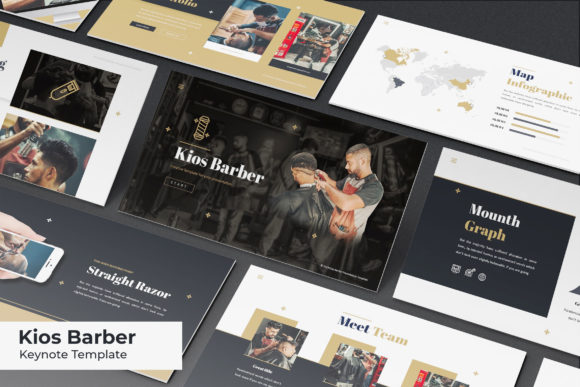
Creating a professional presentation often feels like a choice between spending dozens of hours designing from scratch or settling for a generic template that lacks personality. The Barber Keynote Template bridges this gap by offering a comprehensive design system specifically built for modern creatives and business professionals. This is not merely a collection of slides; it is a robust visual framework containing 150 total slides organized into five distinct premade color variations. With 30 unique slides per color scheme, the template provides enough variety to handle complex narratives while maintaining strict visual consistency throughout your deck.
The visual character of Barber leans into a refined, masculine aesthetic that works exceptionally well for grooming brands, fashion labels, lifestyle bloggers, and creative agencies. However, its utility extends far beyond niche styling. The layout relies on strong grid systems and ample whitespace, creating a sense of premium quality regardless of the content. For entrepreneurs and marketers, this level of polish establishes immediate credibility. When you present data or portfolio work within this structured environment, the audience focuses on your message rather than distracting design inconsistencies. The template serves as a silent partner in your communication strategy, reinforcing professionalism through every transition and section break.
Typography and Visual Hierarchy in Modern Decks
A significant advantage of using a dedicated template like Barber is the pre-established typographic hierarchy. In presentation design, readability is paramount. Audiences cannot pause to re-read a slide, so the typeface choices must guide the eye instantly. This template utilizes free fonts with download links included in the readme file, ensuring that your typography remains consistent across different devices and operating systems. By relying on accessible yet high-quality typefaces, you avoid the common pitfall of broken text formatting when presenting on a computer that lacks specific premium font licenses.
The interplay between display fonts for headers and clean sans serif fonts for body text creates a natural flow. This pairing is essential for maintaining engagement during longer presentations. Whether you are displaying pricing tables, service lists, or biographical information, the contrast between type weights helps differentiate primary messages from supporting details. For content creators and publishers adapting editorial content into slide format, this hierarchy mimics the structure of a well-designed magazine spread. It transforms dense information into digestible visual chunks, making your brand identity feel cohesive and intentional rather than assembled at the last minute.
Leveraging Master Slides for Efficient Customization
Efficiency is the core value proposition for busy professionals. The Barber Keynote Template is built entirely on master slides, which fundamentally changes how you edit and customize the deck. Instead of adjusting elements slide-by-slide, you can make global changes to colors, logos, or background textures that propagate instantly across all 30 slides in a specific color variation. This drag-and-drop functionality respects your time while allowing for deep customization. Picture placeholders are resizable and editable directly within the master layout, meaning you can swap in your own photography without breaking the alignment or aspect ratios designed by the original creator.
This technical foundation supports pixel-perfect illustrations and handcrafted infographics that would be tedious to recreate manually. For small business owners explaining complex services or marketers showcasing quarterly growth, these infographic slides provide a sophisticated way to visualize data. Because they are vector-based and integrated into the master system, they scale perfectly on any screen size. You maintain the integrity of the design even when projecting onto large conference screens or sharing via Zoom. The ability to edit these graphics ensures they remain relevant to your specific narrative, turning stock assets into bespoke brand communication tools.
Strategic Applications Across Creative Industries
While the name suggests a specific industry focus, the structural versatility of the Barber Keynote Template makes it viable for a wide spectrum of commercial and personal projects. Designers and agencies frequently use it for client pitches because the gallery and portfolio slides are optimized for visual impact. The layouts prioritize imagery without sacrificing textual context, allowing creative work to breathe. For e-commerce entrepreneurs, the product showcase sections function similarly to a digital catalog, highlighting features and benefits with clear calls to action.
Bloggers and influencers can repurpose the section break slides as social media graphics or story templates, extending the value of the asset beyond live presentations. The five color variations allow you to match the template to seasonal campaigns or distinct sub-brands without purchasing additional software. Publishers might find the editorial layouts useful for book launches or author talks, where the balance of text and image mirrors traditional print design. In each scenario, the template acts as a container for your unique voice, providing a professional shell that elevates amateur content to agency standards.
Practical Considerations for Implementation
Before integrating this template into your workflow, it is important to understand what is included and what requires external sourcing. The package contains five KEY files and five widescreen KEY files, covering both standard and modern aspect ratios. The readme file provides the necessary font download links, which should be installed before opening the presentation to prevent substitution issues. Crucially, users must note that all photographs and pictures used in the preview are for illustration purposes only and are not included. This distinction is vital for budgeting and planning; you will need to source your own high-resolution imagery to achieve the same level of visual fidelity shown in the marketing materials.
When selecting which of the five color variations to use, consider the lighting conditions of your presentation venue and the emotional tone of your content. Darker themes often convey luxury and sophistication but require high-contrast text for accessibility. Lighter themes generally perform better in brightly lit rooms and printed handouts. Test your chosen variation on the actual display equipment beforehand to ensure color accuracy. Additionally, while the template includes free fonts, always verify the licensing terms if you plan to distribute the final PDF commercially or embed it in a website. Understanding these practical boundaries ensures that the Barber Keynote Template serves as a reliable foundation for your project rather than a source of technical friction.
Ultimately, the value of this design asset lies in its balance of aesthetic appeal and functional depth. It removes the barrier to entry for high-end presentation design, allowing hobbyists, crafters, and established businesses alike to communicate with clarity and style. By utilizing the master slide architecture and respecting the typographic guidelines, you can produce decks that look custom-commissioned while retaining full control over the content. Whether you are pitching investors, teaching a workshop, or showcasing a new product line, this template provides the visual vocabulary necessary to make your message resonate.