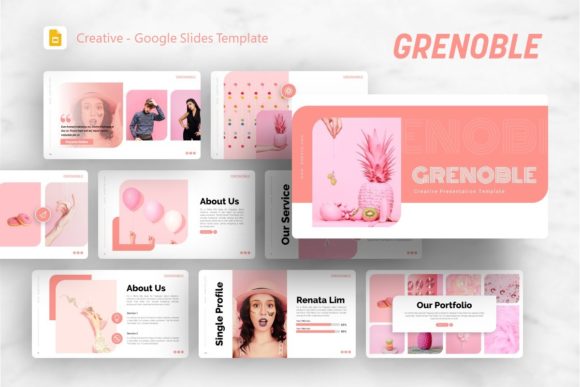
Evaluating the Grenoble Google Slides Template for Professional Presentations
In the landscape of digital presentation tools, finding a balance between aesthetic appeal and functional utility is often a challenge. The Google Slides Template - Grenoble emerges as a notable option for professionals who require a versatile design framework without the steep learning curve of complex graphic design software. This template is positioned not merely as a collection of pre-designed slides, but as a comprehensive system intended to streamline the creation of business decks, portfolios, and creative pitches. For users ranging from startup founders to freelance photographers, understanding the practical application and structural integrity of this asset is essential before integrating it into a professional workflow.
Core Characteristics and Structural Design
The primary value proposition of the Grenoble template lies in its volume and organizational structure. It provides 36 unique slides per template variation, which offers sufficient breadth to cover most standard presentation narratives without forcing repetitive layouts. Unlike simpler templates that may only offer five or six basic masters, Grenoble includes specialized layouts tailored for specific content types. This variety is crucial for maintaining audience engagement throughout a longer deck, as visual monotony is a common pitfall in corporate and educational presentations.
A significant technical advantage is the reliance on Master Slides. In many lower-quality templates, design elements are placed directly on individual slides, making global changes tedious and error-prone. Grenoble appears to be built correctly upon master slide architecture. This means that updating a logo, changing a color palette, or adjusting font hierarchy can be done globally across all 36 slides with minimal effort. For agencies or businesses managing multiple decks, this consistency ensures brand compliance and drastically reduces formatting time. The inclusion of handcrafted infographics specifically designed within PowerPoint-compatible formats further enhances usability, allowing data visualization to remain editable rather than being locked as static images.
Versatility Across Professional Use Cases
The Grenoble template is marketed for a wide array of purposes, including Creative Agency profiles, Company Overviews, Pitch Decks, and Personal Portfolios. From a practical standpoint, this versatility stems from a neutral yet sophisticated visual language. The design avoids overly niche stylistic choices that might alienate certain audiences, instead opting for clean lines and ample whitespace that allow user content to take precedence.
For startups and entrepreneurs, the pitch deck components are particularly relevant. Investors typically expect specific slides regarding market size, traction, team structure, and financial projections. Grenoble’s inclusion of dedicated layouts for these sections suggests an understanding of narrative flow beyond simple aesthetics. Similarly, creative professionals and photographers will find the portfolio layouts useful. The picture placeholders are designed with drag-and-drop functionality, which simplifies the process of swapping demo images with actual work. However, users should note that while the layout supports high-resolution imagery, the performance of the slide deck in browser-based environments depends heavily on image optimization.
Corporate teams and educators benefit from the infographic and data-driven slides. The ability to resize and edit vector graphics directly within Google Slides eliminates the need to toggle between external illustration software and the presentation platform. This integrated workflow is where the template demonstrates genuine efficiency gains over starting from scratch or using generic default themes.
Technical Usability and Asset Management
When evaluating any digital asset, the quality of included files and documentation determines long-term viability. The Grenoble package includes the Google Slides file, a documentation file, and vector icons. The presence of dedicated documentation is a positive indicator of developer support; it reduces the friction of onboarding and helps users troubleshoot customization issues independently. Vector icons are another critical inclusion, as they ensure that graphical elements remain crisp on high-DPI displays and large projection screens, avoiding the pixelation associated with rasterized PNGs or JPEGs.
It is important to address the licensing and asset expectations realistically. As noted in the product specifications, all images shown in the preview are for demonstration purposes only and are not included in the downloadable files. This is standard industry practice, but it requires users to have their own library of stock photography or original assets ready before beginning customization. Professionals should factor this preparation time into their project planning. Furthermore, while the template is described as "pixel-perfect," achieving this level of polish in a live environment requires adherence to alignment guides and grid systems provided within the master slides. Deviating from these constraints can quickly degrade the visual quality, so discipline in layout management is necessary.
Strengths and Practical Limitations
No template is universally perfect, and Grenoble has distinct strengths alongside potential limitations depending on user needs. The primary strength is undoubtedly the combination of quantity and editability. Having 36 fully customizable, master-slide-based layouts provides a robust foundation that scales well for both short updates and comprehensive reports. The cross-compatibility with PowerPoint for infographic editing also bridges the gap between two dominant platforms, offering flexibility for teams with mixed software preferences.
However, users should be aware of potential constraints. A template with 36 slides carries more weight than a minimal theme. While generally optimized, extensive use of high-resolution media and complex vector animations could impact load times on slower connections or older hardware. Additionally, because the design is crafted to be broadly applicable, organizations with extremely rigid or unconventional brand guidelines may find themselves overriding significant portions of the master styles. In such cases, the time saved by using a template must be weighed against the time spent deconstructing existing styles to fit new ones. For highly regulated industries requiring specific accessibility compliance (such as WCAG standards), users must still manually verify contrast ratios and screen reader compatibility, as no commercial template can guarantee automatic adherence to evolving legal standards.
Determining Fit for Your Workflow
Deciding whether to adopt the Google Slides Template - Grenoble ultimately depends on your current resources and presentation frequency. For freelancers, small business owners, and marketers who produce decks regularly but lack a dedicated design team, this template represents a high-value efficiency tool. It effectively outsources the initial design phase, allowing focus to shift entirely to content strategy and messaging. The investment is justified if you anticipate creating more than three or four presentations annually, as the cumulative time savings in formatting and layout selection will outweigh the initial setup cost.
Conversely, for individuals who rarely present or those whose content is purely text-heavy without need for visual storytelling, a simpler solution may suffice. Similarly, large enterprises with established internal design systems may find greater value in commissioning custom templates that align precisely with existing brand assets rather than adapting a third-party product like Grenoble.
Ultimately, Grenoble serves as a competent, middle-ground solution in the presentation ecosystem. It avoids the amateurish feel of free templates while remaining accessible enough for non-designers to manipulate effectively. By leveraging its master slide architecture, vector assets, and diverse layout options, professionals can elevate their visual communication standards without requiring advanced technical skills. Success with this tool relies less on the template itself and more on the user's willingness to utilize its structural features as intended, ensuring that the final output remains polished, consistent, and focused on delivering clear information to the target audience.