Cibo Power Point Template: A Practical Design System for Food and Lifestyle Presentations
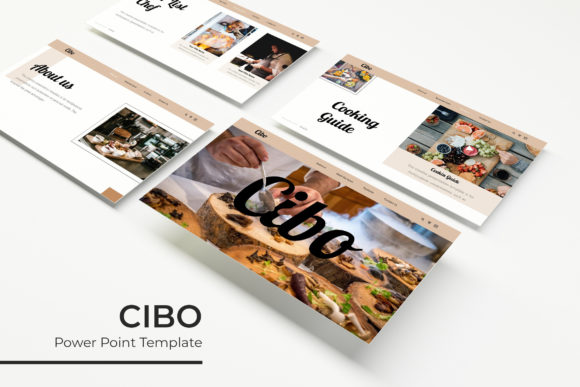
Creating a visually compelling presentation for the food industry requires more than just appetizing photography; it demands a structured design system that communicates quality, hygiene, and creativity. The Cibo Power Point Template serves as this foundational toolkit for professionals who need to bridge the gap between culinary concepts and business strategy. Rather than starting from a blank slide, users gain access to a comprehensive library of 150 total slides organized across five distinct premade color themes. This structure allows entrepreneurs, marketers, and educators to focus on their narrative and data rather than struggling with alignment, font pairing, or layout consistency.
Strategic Applications in Culinary Business and Marketing
For restaurant owners and hospitality managers, the primary challenge is often securing investment or aligning stakeholders on a new concept. Cibo facilitates this by providing specific layouts designed for pitch decks and operational overviews. When presenting a new menu launch or a franchise expansion plan, the template’s handcrafted infographic slides allow you to visualize complex data such as cost breakdowns, customer demographics, or supply chain logistics without cluttering the screen with text. The pixel-perfect illustrations ensure that even financial projections maintain the aesthetic warmth associated with food culture, keeping investors engaged emotionally while reviewing hard numbers.
Marketing agencies and freelancers working with food brands face tight deadlines and high client expectations. The drag-and-drop functionality based on master slides significantly reduces production time. Instead of formatting individual elements on every page, changes made to the master slide propagate instantly across the deck. This is particularly useful when adapting a campaign proposal for different clients or tweaking a brand's color palette mid-project. With 30 slides dedicated to each of the five color variations, designers can quickly swap between a vibrant, energetic theme for a fast-food campaign and a muted, elegant palette for a fine-dining establishment without rebuilding the presentation architecture.
Educational and Instructional Use Cases
Culinary instructors, nutritionists, and workshop leaders require clarity above all else. Whether teaching knife skills, explaining macronutrient profiles, or outlining food safety protocols, the visual hierarchy must guide the learner’s eye logically. Cibo includes section break slides that act as mental pauses, helping students transition between topics effectively. The resizable and editable graphic placeholders are essential here; an instructor can insert step-by-step process photos or anatomical diagrams of ingredients without breaking the slide’s professional layout. This consistency helps maintain student focus and reinforces learning through predictable visual cues.
For bloggers and content creators repurposing long-form articles into digital courses or webinars, this template offers a cohesive visual identity. The portfolio and gallery slides are specifically engineered to showcase high-resolution food photography alongside concise captions. This transforms a standard lecture into a visual experience that mirrors the quality of modern food media. By using a template built specifically for this niche, creators avoid the disjointed look that often occurs when forcing generic corporate templates to accommodate organic, textured imagery.
Navigating Customization and Technical Features
The true value of the Cibo Power Point Template lies in its editability. Users should understand that the 150 slides are not static images but fully vector-based environments. Every chart, icon, and shape can be resized, recolored, and reshaped directly within PowerPoint. This is critical for maintaining brand compliance. If your organization uses a specific shade of green not included in the five premade options, you can adjust the global color scheme via the master slide settings to match your exact brand guidelines. The inclusion of five PPTX widescreen files ensures compatibility with modern displays and projectors, preventing the awkward black bars that appear when using older 4:3 aspect ratios.
Potential users must also be aware of what is required to maximize this resource. While the template includes a readme file with free font download links, ensuring typography renders correctly is a prerequisite before opening the files. Installing these fonts first prevents substitution errors that can alter spacing and line breaks. Additionally, it is vital to note that all photographs used in the preview are for illustration purposes only and are not included. Users must have their own library of high-quality images ready to populate the picture placeholders. This separation of design and content is intentional, allowing the template to remain versatile across different cuisines and branding styles without licensing conflicts.
Choosing the Right Color Variation for Your Audience
Selecting among the five color variations should be a strategic decision based on psychological impact rather than personal preference. Warm tones may stimulate appetite and convey comfort, making them ideal for bakery proposals or family-style restaurant menus. Cooler or neutral tones might better suit health-tech startups, sustainable agriculture reports, or clinical nutrition presentations where trust and cleanliness are paramount. Because each color set contains 30 unique slides, committing to one variation provides enough depth for a full keynote or annual report, while mixing variations can help distinguish different chapters in a longer document.
Practical Considerations Before Implementation
Before downloading or purchasing, assess your current workflow and technical environment. This template is optimized for PowerPoint, and while some features may translate to other software, full editability of master slides and infographics is best experienced in the native application. Consider the volume of content you intend to present. With 150 slides available, there is a risk of over-inclusion. Effective presenters use this abundance as a selection pool, choosing only the 15 to 20 slides that truly support their message, rather than feeling obligated to use every asset provided.
Furthermore, evaluate the quality of your existing assets. The picture placeholders are designed to highlight professional-grade imagery. Low-resolution or poorly lit photos will stand out negatively against the pixel-perfect vector graphics and clean typography. Investing time in curating or commissioning strong visuals is necessary to achieve the polished look demonstrated in the previews. For users lacking design training, the handcrafted nature of the infographics serves as a guardrail, preventing common mistakes like overcrowding or poor contrast, but it cannot compensate for weak source material.
Long-Term Value and Reusability
Beyond a single presentation, Cibo functions as a reusable design asset. Small business owners can establish a consistent visual language for quarterly reviews, staff training, and investor updates by returning to the same template family. This repetition builds brand recognition and reduces the cognitive load of creating new designs from scratch for every meeting. Freelancers can license the template for multiple projects (subject to licensing terms), amortizing the cost across various clients and increasing profit margins by decreasing design hours. The key is to treat the template not as a disposable wrapper, but as a flexible design system that evolves alongside your business or creative endeavors.
Ultimately, the Cibo Power Point Template addresses the specific friction points of food-related communication. It acknowledges that this industry operates at the intersection of sensory appeal and rigorous business metrics. By providing specialized layouts, editable vectors, and varied color systems, it empowers users to produce professional-grade presentations that respect both the artistry of food and the demands of modern business communication. Success with this tool depends less on the number of slides and more on the intentionality with which they are selected and customized to tell a clear, authentic story.