Maximizing Presentation Impact with the Booklet Keynote Template
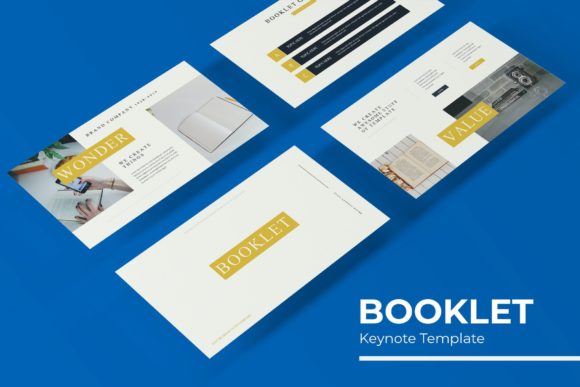
In the fast-paced world of digital communication, the difference between a forgettable presentation and a compelling narrative often lies in visual cohesion. Professionals frequently struggle to balance content creation with graphic design, resulting in slides that look disjointed or amateurish. The Booklet Keynote Template addresses this friction point directly by offering a comprehensive design system rather than just a collection of isolated slides. With 150 total slides organized into five distinct premade color themes, this template serves as a robust foundation for agencies, educators, marketers, and corporate teams who need to produce high-quality visuals without starting from scratch.
The true value of this asset extends beyond mere aesthetics. It is engineered for workflow efficiency. By providing 30 unique slides for each of the five color variations, users can maintain brand consistency across multiple projects or departments without repetitive manual formatting. Whether you are pitching a new product, reporting quarterly metrics, or showcasing a creative portfolio, the structural integrity of this template ensures your message remains the focal point.
A System Built on Master Slides and Global Edits
One of the most critical factors to consider when adopting any presentation template is its underlying architecture. Many downloadable templates rely on individual slide formatting, meaning that changing a font or accent color requires editing dozens of slides individually. The Booklet Keynote Template avoids this pitfall through a rigorous Master Slide structure. This approach allows for global, instantaneous changes across the entire deck.
When you adjust a master element, such as a header style, footer placement, or primary color palette, the change propagates to every associated slide. This feature is indispensable for modern workflows where branding guidelines evolve frequently. For agencies managing multiple clients, this means switching between brand identities takes seconds rather than hours. The pixel-perfect illustrations included in the package are anchored to these masters, ensuring that graphics never appear stretched, misaligned, or blurry regardless of how the content is adjusted.
Handcrafted Infographics and Data Visualization
Data visualization is often the weakest link in business presentations. Standard chart tools can feel rigid, while custom illustration is time-prohibitive. This template bridges that gap with handcrafted infographics designed specifically within Keynote. Unlike static images imported from external software, these graphics are fully editable vectors.
- Native Editability: You can change colors, resize elements, and modify text directly within Keynote without needing Illustrator or Photoshop.
- Visual Consistency: The infographics share the same design language as the rest of the deck, preventing the "copy-paste" look that plagues many data-heavy presentations.
- Variety of Formats: From timeline processes to statistical breakdowns, the infographic library covers common business storytelling needs.
This level of integration ensures that complex information is digestible and visually aligned with your narrative strategy. Because the graphics are vector-based, they remain crisp on everything from laptop screens to large-format projection displays.
Strategic Layouts: Galleries, Portfolios, and Section Breaks
A successful presentation requires rhythm. Continuous streams of bullet points fatigue audiences, while thoughtful pacing maintains engagement. The Booklet Keynote Template includes specialized layouts designed to control this narrative flow. Section break slides act as visual palate cleansers, signaling transitions between topics and giving the audience a moment to process previous information before moving forward.
For creative professionals and product-focused teams, the Gallery and Portfolio slides are particularly significant. These layouts prioritize imagery over text, utilizing clean grids and whitespace to let photographs speak for themselves. They are ideal for case studies, architectural showcases, fashion lookbooks, or product catalogs. The resizable picture placeholders utilize drag-and-drop functionality, making it effortless to swap preview images with your own assets while maintaining perfect aspect ratios and alignment.
Practical Considerations for Image Placeholders
It is vital to manage expectations regarding visual assets. While the template preview features stunning photography, all photographs or pictures used in the preview are not included. They serve strictly for illustration purposes to demonstrate layout potential. Users must supply their own imagery. However, the intelligent masking system within the template makes integrating personal photos seamless. The placeholders are designed to accommodate various orientations, reducing the need for extensive photo cropping or editing prior to insertion.
Technical Specifications and File Management
Compatibility and accessibility are non-negotiable in professional environments. This template package is thorough in its technical delivery, ensuring users have exactly what they need for different display contexts. The download includes 5 KEY files, corresponding to the five premade color schemes. Each file is available in widescreen format, which is the current industry standard for modern displays and video conferencing platforms.
The inclusion of five distinct color variations offers strategic flexibility. Organizations can assign specific colors to different types of communication—for example, using blue for internal reports, green for sustainability initiatives, and orange for marketing pitches—all while retaining the same familiar slide structure. This reduces cognitive load for recurring audiences who associate specific visual styles with particular content types.
Typography and Resource Accessibility
Fonts can be a major stumbling block when sharing presentation files across different computers. Missing fonts lead to broken layouts and unprofessional appearances. The Booklet Keynote Template mitigates this risk by utilizing free, high-quality typography. A Readme First file is included with direct download links for all necessary fonts. This proactive resource management ensures that collaborators, clients, or conference organizers can open and edit the file without typographic errors. Always install these fonts before opening the KEY files to guarantee the intended visual experience.
Integrating the Template into Modern Workflows
Adopting a comprehensive template like Booklet is not just about saving time on a single project; it is about establishing a scalable design operation. In agency settings, this template can serve as a white-label base for client deliverables. Marketing teams can use it to create standardized sales decks that field representatives can customize locally without breaking brand guidelines. Educators and trainers benefit from the consistent visual hierarchy, which helps students navigate course materials more effectively.
The drag-and-drop nature of the graphic elements lowers the barrier to entry for non-designers. Team members without formal graphic training can still produce polished, professional-grade slides because the heavy lifting of composition and alignment has already been solved. This democratization of design quality is perhaps the template's most practical benefit in collaborative environments.
Evaluating Fit for Your Specific Needs
Before implementing this template, consider your content volume and visual requirements. With 150 slides, this is a heavyweight solution best suited for users who need variety and depth. If you only ever create five-slide updates, this may be excessive. However, for organizations that produce diverse content types—from data-rich annual reviews to image-heavy product launches—the breadth of options prevents creative stagnation.
Also, assess your team's comfort level with Keynote's master slide functionality. While the template is user-friendly, maximizing its efficiency requires understanding how master slides differ from individual slide edits. Investing ten minutes to understand the master slide structure will yield exponential time savings over the lifespan of the template. The handcrafted nature of the infographics also means that while they are editable, they have a specific artistic style. Ensure this aesthetic aligns with your brand identity before committing to the platform.
Ultimately, the Booklet Keynote Template represents a shift from treating presentations as disposable documents to treating them as managed design assets. By combining pixel-perfect craftsmanship with practical editing features, it enables users to focus on storytelling and strategy rather than pixel-pushing. The result is consistently high-quality output that respects both the creator's time and the audience's attention.