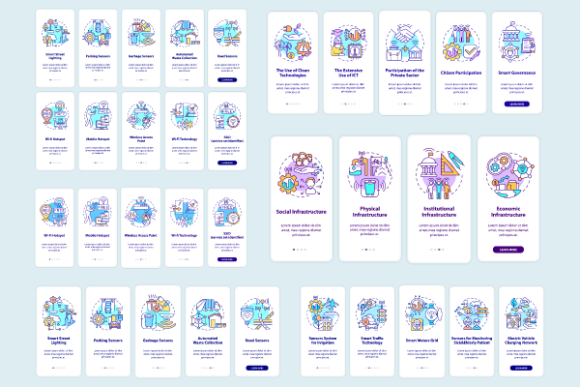
Evaluating the Smart City Projects App Pages Bundle for Modern Urban Interface Design
Designing digital interfaces for smart city initiatives requires a distinct balance between technical complexity and public accessibility. Unlike standard e-commerce or social media applications, urban technology platforms must communicate infrastructure data, civic engagement tools, and sustainability metrics to a diverse demographic. The Smart City Projects App Pages Bundle addresses this specific niche by providing pre-structured layouts tailored for municipal and urban tech environments. When evaluating whether to utilize this onboarding mobile app page screens bundle or to commission custom designs from scratch, product teams must weigh factors such as development velocity, visual consistency, and long-term scalability.
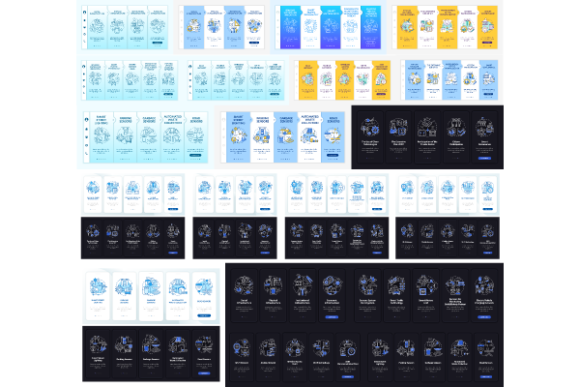
This resource is not merely a collection of generic screens; it is a specialized toolkit designed to bridge the gap between complex backend urban data and user-friendly frontend experiences. It includes comprehensive walkthroughs, linear illustrations for both night and day modes, and vector-based templates that support high-fidelity prototyping. For designers and project managers comparing options, understanding the specific utility of these assets against broader UI kits is essential for making an informed procurement decision.
Distinguishing Features in the Urban Tech Category
When researching design resources, professionals often encounter generalist UI kits that cover broad categories like fintech, health, or travel. While versatile, these kits frequently lack the semantic structure required for smart city projects. The Smart City Projects App Pages Bundle distinguishes itself through domain-specific relevance. The included screens are conceptualized around urban use cases: energy monitoring, public transit integration, waste management reporting, and community feedback loops.
A critical differentiator in this bundle is the inclusion of five-step graphic instructions with concepts specifically mapped to civic onboarding. Onboarding for a smart city app differs significantly from commercial apps; users are often being introduced to new behaviors regarding recycling, commuting, or energy consumption rather than simply learning navigation. The provided graphics offer a visual framework for behavioral education, reducing the cognitive load during the initial user experience. Furthermore, the provision of linear illustrations in both night and day modes acknowledges the 24-hour nature of urban living. Residents interact with city services at all hours, and interface adaptability is a functional requirement, not just an aesthetic preference.
File Format Versatility and Workflow Integration
Technical compatibility is a primary decision factor when selecting design assets. This bundle supports a multi-format workflow by including JPEG, AI, PNG, EPS, and SVG files. This variety serves different stages of the product lifecycle:
- SVG and EPS: Essential for scalable vector graphics that remain crisp on any device resolution, crucial for accessibility standards in public sector software.
- AI (Adobe Illustrator): Allows for deep customization of vector elements, enabling teams to align icons and illustrations with existing municipal branding guidelines.
- PNG and JPEG: Useful for rapid prototyping, stakeholder presentations, and documentation where editable vectors are unnecessary.
Compared to web-only asset packs that may only offer rasterized images or CSS snippets, this vector-heavy approach ensures that the Smart City Projects App Pages Bundle remains viable as screen technologies evolve. Teams working within strict government accessibility mandates will find the vector formats particularly valuable for maintaining contrast ratios and responsive scaling without quality loss.
Comparative Analysis: Bundled Assets vs. Custom Development
The most common alternative to using a specialized bundle is bespoke design. Understanding the tradeoffs between these two approaches helps determine the right fit for your project timeline and budget.
Speed to Market and Stakeholder Alignment
Smart city projects often face intense scrutiny from public stakeholders and government officials. Securing buy-in can be difficult when presenting abstract wireframes. The Smart City Projects App Pages Bundle accelerates the visualization phase, allowing teams to present high-fidelity concepts early in the discovery process. Where custom design might require weeks to reach a presentable state for a town hall meeting or grant review, utilizing pre-designed onboarding screens can reduce this timeline to days.
However, this speed comes with constraints. If a municipality has highly unique legacy systems or non-standard data visualization requirements, the bundle may serve better as a mood board or structural reference than a direct implementation. Custom development remains superior for projects with zero precedent or highly proprietary hardware integrations.
Cost Efficiency and Resource Allocation
For agencies and startups operating with fixed grants or limited venture capital, the cost differential is significant. Licensing a comprehensive onboarding mobile app page screens bundle represents a fraction of the cost of hiring senior UI/UX designers for the equivalent hours of illustration and layout work. The savings allow teams to reallocate budget toward backend engineering, security auditing, or user testing—areas where smart city apps frequently fail due to underfunding.
Conversely, well-funded enterprise teams with established design systems may find that integrating external assets creates maintenance debt. If your organization already possesses a mature design system with defined tokens for urban interfaces, introducing a third-party bundle could create inconsistency. In such cases, the bundle is best used for competitive analysis or inspiration rather than production assets.
Assessing UX Quality and Accessibility Standards
In the context of public infrastructure, User Experience (UX) is synonymous with accessibility. A smart city app that excludes portions of the population fails its core mandate. When evaluating this bundle, professionals should assess its adherence to inclusive design principles compared to other market options.
The linear illustration style included in this collection is generally preferable for accessibility over complex, textured, or photorealistic graphics. Linear styles tend to scale better and allow for easier color manipulation to meet WCAG contrast requirements. The explicit inclusion of night mode assets suggests an awareness of visual ergonomics, which is vital for users interacting with apps in low-light environments or those with light sensitivity.
However, buyers must verify that the template’s information architecture aligns with local accessibility regulations. While the GUI vector template provides excellent visual foundations, compliance often requires region-specific adjustments to typography sizing, touch target areas, and screen reader compatibility. The bundle provides the visual layer, but the semantic implementation remains the responsibility of the development team.
Best-Fit Scenarios and Limitations
No single resource fits every project. Based on comparative evaluation, the Smart City Projects App Pages Bundle is ideally suited for specific scenarios while presenting limitations in others.
When This Bundle Is the Right Choice
- MVP Development: Startups and innovation labs testing new urban tech concepts need to validate ideas quickly without heavy upfront design investment.
- Agency Pitching: Design agencies responding to RFPs for municipal contracts can use these assets to demonstrate capability and vision before winning the work.
- Standardized Civic Apps: Projects focusing on common urban functions (parking, reporting, transit) will find the pre-built patterns immediately applicable.
- Cross-Platform Consistency: Teams needing to maintain visual parity across iOS, Android, and web dashboards benefit from the unified vector source files.
When to Consider Alternatives
- Highly Branded Legacy Systems: If integrating into a decades-old municipal portal with rigid styling rules, the modern aesthetic of this bundle may clash irreconcilably.
- Niche Industrial IoT: Apps designed exclusively for city engineers or maintenance crews often require dense, data-heavy interfaces that differ vastly from citizen-facing onboarding screens.
- Regulatory-Specific Compliance: Projects with unique legal requirements for data display that deviate from international standards may require custom ground-up design.
Leveraging Ecosystem Resources for Comprehensive Design
Evaluating a design asset should also include considering the vendor's broader ecosystem. BSD studio provides a variety of products, topics, and file types, ensuring continuity if project scope expands. Smart city projects rarely exist in isolation; they often require supporting collateral such as brochure templates for public outreach, infographic elements for annual reports, and icon sets for signage.
Sourcing these complementary assets from the same provider reduces visual friction across touchpoints. When a mobile app, a printed pamphlet, and a web dashboard share a consistent design language, public trust increases. Count on us in search for icons, brochure templates, infographic elements, mobile app screen pages and so much more. This integrated approach allows teams to maintain top quality while saving time on design work across multiple deliverables.
Ultimately, the decision to adopt the Smart City Projects App Pages Bundle should be driven by project constraints, audience needs, and technical requirements. By carefully weighing the efficiency of pre-built onboarding mobile app page screens against the flexibility of custom design, teams can select the path that best serves their urban innovation goals. Whether used as a foundational production asset or a strategic prototyping tool, this collection offers a practical solution for navigating the complexities of smart city interface design.