Clayzone Google Slide Template: Design & Presentation Guide
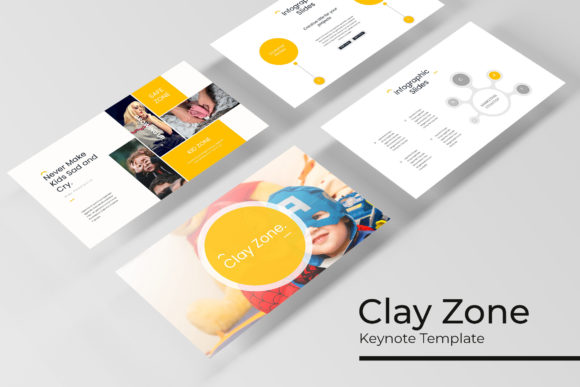
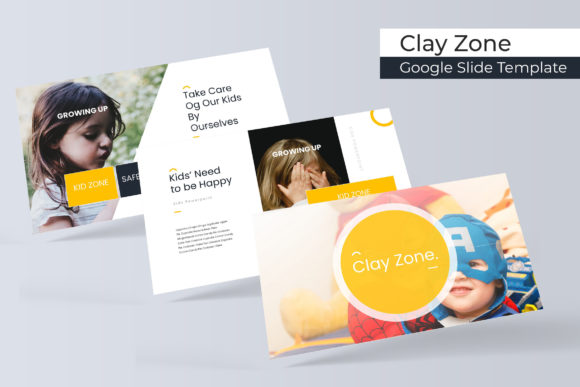
Elevating a presentation from a simple data dump to a compelling visual narrative requires more than just good content; it demands a cohesive design system that guides the audience through your ideas. The Clayzone Google Slide Template offers a structured yet flexible foundation for creators, marketers, and educators who need professional aesthetics without starting from scratch. With 150 total slides distributed across five distinct premade color themes, this template set is engineered to solve the common friction points of slide design: inconsistency, lack of visual hierarchy, and the time-consuming nature of custom illustration.
Rather than forcing a single aesthetic onto every project, Clayzone provides thirty unique slides for each of its five color variations. This modular approach allows you to select a palette that aligns with specific brand guidelines or emotional tones. Whether you are pitching a startup concept, teaching a workshop, or showcasing a creative portfolio, the handcrafted infographic elements and pixel-perfect illustrations ensure that your visual communication remains sharp and intentional. The true value lies not just in the volume of assets, but in their adaptability to diverse professional contexts.
Leveraging Color Psychology and Visual Consistency
Color is rarely just decorative in effective communication; it is functional. The five premade color schemes included in Clayzone are designed to serve different rhetorical purposes. When selecting a variation, consider the psychological impact of the palette on your specific audience. A high-contrast theme might be appropriate for financial reports or urgent calls to action, while softer, muted tones could better suit educational content or wellness-focused pitches. Because each color variation includes thirty dedicated slides, you avoid the common pitfall of mismatched elements that often occurs when manually recoloring disparate templates.
Consistency builds trust. When your section break slides, galleries, and data visualizations share a unified DNA, the audience can focus on your message rather than being distracted by disjointed design choices. The master slide architecture ensures that global changes propagate correctly throughout the deck. If you decide to adjust a primary accent color halfway through your design process, the editable graphics update systematically. This technical reliability frees up mental bandwidth, allowing you to concentrate on refining your narrative arc and speaker notes rather than troubleshooting alignment issues.
Practical Applications for Diverse Audiences
The versatility of the Clayzone Google Slide Template becomes apparent when applied to specific user scenarios. Different professions require different structural approaches, and the 150-slide library covers a broad spectrum of needs:
- Entrepreneurs and Startups: Use the handcrafted infographics to simplify complex business models or market data. Investors appreciate clarity over clutter. The dedicated section breaks help pace a pitch deck, signaling transitions between problem identification, solution overview, and financial projections.
- Educators and Trainers: Teaching requires visual reinforcement of key concepts. The resizable picture placeholders allow for easy integration of diagrams, historical photos, or case study imagery. The consistent layout helps students anticipate information structure, reducing cognitive load during lectures.
- Creative Professionals: For designers, photographers, or architects, the gallery and portfolio slides are essential. These layouts prioritize negative space and image quality, ensuring that your work remains the focal point. The pixel-perfect illustrations complement creative work without competing with it.
- Marketers and Bloggers: Repurposing content is a key efficiency strategy. Slides designed for presentations can easily be exported as social media carousels or blog headers. The widescreen format translates well to digital platforms, extending the lifespan of your creative assets beyond a single meeting.
Mastering Layouts: Infographics and Portfolios
Data visualization is often where presentations fail. Generic charts can feel impersonal or confusing. Clayzone addresses this with handcrafted infographic slides that transform raw numbers into digestible stories. These are not merely static images; they are fully editable vector-based graphics within PowerPoint and Google Slides. You can adjust values, change labels, and modify colors to match your dataset precisely. This level of customization ensures that the visual metaphor accurately represents your specific data, rather than forcing your data to fit a rigid pre-existing chart.
Similarly, the portfolio and gallery sections are designed with modern grid systems that respect aspect ratios. Picture placeholders utilize a drag-and-drop functionality that automatically crops and masks images according to the master slide layout. This eliminates the tedious manual resizing that often leads to stretched or pixelated visuals. For users compiling case studies or project retrospectives, these slides provide a clean container that elevates the perceived quality of the work being showcased. Remember to use high-resolution source images to maintain the integrity of the pixel-perfect design framework.
Technical Workflow and Asset Management
Understanding what is included in the package is crucial for an efficient workflow. The Clayzone download provides five PPTX files and five corresponding widescreen versions, ensuring compatibility across different display environments and software preferences. The inclusion of a Readme file with free font download links is a critical detail; typography defines the voice of your presentation. Using the intended typefaces preserves the designer’s original spacing and hierarchy. Substituting fonts without adjusting kerning or line height can inadvertently break the visual rhythm.
It is important to manage expectations regarding imagery. All photographs used in preview materials are for illustration purposes only and are not included in the template. This is standard practice in professional design resources, as it prevents licensing conflicts and encourages users to source authentic imagery relevant to their specific context. Treat the preview photos as placeholders indicating where visual weight should sit, rather than content to be replicated. Sourcing your own photography or utilizing reputable stock libraries ensures your presentation feels original and tailored to your actual subject matter.
Strategies for Effective Customization
While the template provides a robust starting point, the most successful presentations are those that balance template efficiency with bespoke customization. Avoid using every available slide simply because they exist. Curate your deck ruthlessly. Select only the layouts that actively support your current narrative. A concise twenty-slide deck with strong flow is invariably superior to a fifty-slide marathon that loses momentum.
When editing the resizable graphic elements, maintain the established padding and margins. The "pixel-perfect" quality of Clayzone relies on precise spatial relationships. Stretching elements disproportionately or crowding text boxes can degrade the professional finish. If you need to add new content that doesn't fit existing layouts, duplicate the closest matching master slide and adapt it, rather than creating a new slide from a blank canvas. This maintains the underlying style guide and ensures that even your custom additions feel native to the deck.
Finally, consider the delivery context. Widescreen formats are standard for modern displays and video conferencing, but always verify the aspect ratio of the presentation environment beforehand. The dual format inclusion (standard and widescreen) mitigates technical risks during live events. By combining the structural advantages of the Clayzone Google Slide Template with thoughtful curation and authentic content, you create a presentation tool that serves your goals effectively. The template handles the heavy lifting of design consistency, empowering you to focus on connecting with your audience and delivering value through clear, organized, and visually resonant communication.